Part 3 — Agentic OS using GitHub Copilot
How does Copilot's agent system work, and how do I govern it?
6 min · Updated June 2026
If you read Part 2, you know the Claude Code side of the harness. Copilot’s system has the same seven primitives — but different surface area, different governance controls, and a few sharp edges that will catch you if you don’t know about them. This section maps the whole thing.
Every Copilot template from this page in one download. Mid-2026 snapshot — copy and edit, don't run as-is.
3.1 — Copilot seems to have several layers of instruction files and I'm not sure how they interact. Help me understand the hierarchy and which file wins.
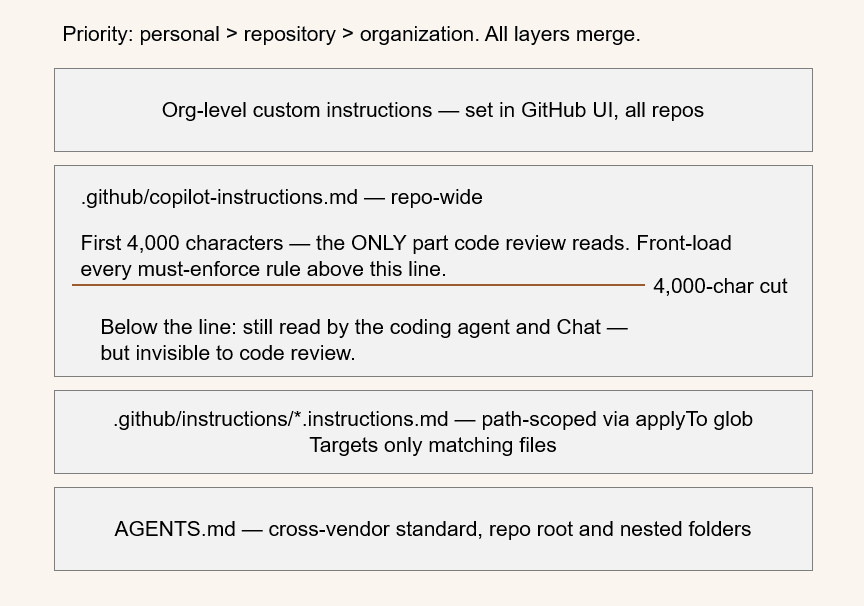
Copilot has the most flexible instruction system of any agent in 2026, with several layers:
.github/copilot-instructions.md— repository-wide, always applied..github/instructions/**/*.instructions.md— path-scoped files. Each carries anapplyToglob in its frontmatter, so a rule can target only certain files. This works for the Copilot cloud agent, code review, and IDE chat in VS Code / Visual Studio.AGENTS.md— supported at the repo root and in nested folders. This is the cross-vendor standard (covered in Part 6).- Org-level custom instructions — set in the GitHub UI, applied across all repos.
Priority is Personal > Repository > Organization.
---
applyTo: "internal/payments/**/*.go"
---
- All monetary values are int64 minor units; never floats.
- Every transaction mutation must call audit.Emit().
- New payment endpoints require sign-off from the payments team.
One sharp edge: Copilot code review only reads the first 4,000 characters of an instruction file. The coding agent and Chat have no such limit, but if you care about code-review behavior, front-load the important rules.
3.2 — I already understand Claude subagents and want to know how Copilot's custom agents map onto that. What are the similarities and where they differ?
Custom agents went GA across Copilot surfaces during 2026. You define them in .github/agents/<name>.agent.md (project scope) or ~/.copilot/agents/<name>.agent.md (user scope). Organization- and enterprise-wide custom agents live in a special .github-private repository and become available across all repos.
---
name: security-scout
description: Reviews PRs for security regressions in auth and payment paths.
tools: [codebase, search, problems]
model: claude-4.7-sonnet
---
You review diffs only. Report severity, location, risk, and fix.
Escalate any hard-coded secret as CRITICAL.
Agents are invoked via @-mention (@security-scout), the agent picker, /agent in Copilot CLI, or by assigning the agent to a GitHub issue (which kicks off the cloud coding agent).
Compared to Claude subagents: the concept is the same — scoped persona, scoped tools, chosen model. The differences are surface and frontmatter schema. Claude subagents are deeply integrated into an interactive pipeline with context forking; Copilot custom agents shine when assigned to issues for autonomous, asynchronous work. In the common harness you’ll keep one shared prompt body and two thin frontmatter wrappers.
3.3 — I keep seeing prompt files and chat modes mentioned alongside Copilot agents. What are these lower-level pieces and when I'd use each?
These are the lower-level building blocks beneath custom agents:
.github/prompts/*.prompt.md— reusable, invokable prompts. They show up as slash commands in the IDE. Good for repeatable chores like scaffolding a new service module per your template..github/chatmodes/*.chatmode.md— persona definitions with atools:array (codebase,search,usages,problems,runCommands,runTasks,findTestFiles, etc.). They change how Chat behaves for a working session.
Both are supported in VS Code, Visual Studio, and JetBrains. In harness terms, prompt files map roughly to Claude slash commands, and chat modes map roughly to a subagent’s persona and first-message behavior.
3.4 — I want to wire external tools into Copilot via MCP but I'm worried about controlling what gets connected. How MCP works here and how to govern it.
Copilot supports MCP across local stdio servers, remote HTTP (Streamable), and the older SSE transport. Configuration lives in ~/.copilot/mcp-config.json (CLI), .vscode/mcp.json (workspace), or the GitHub MCP Registry / VS Code MCP gallery. The remote GitHub MCP server is built into Copilot CLI and the cloud agent.
Governance is via the MCP servers in Copilot organization/enterprise policy. It’s disabled by default and applies only to Business/Enterprise plans. Admins specify a registry URL allowlist and can enforce “Registry only.”
Important honesty from GitHub’s own Well-Architected guidance: registry enforcement matches on server name, can be bypassed, and does not apply to the cloud agent. Treat it as a governance signal and an IDE discoverability layer — not a hard security boundary. For a real boundary, run MCP servers behind a controlled gateway you operate.
3.5 — I'd like Copilot reviewing PRs automatically against our standards. How to implement this automated code review and how to turn it on?
Copilot code review is the AI-review automation layer. You customize it with the same instruction files as everything else — .github/copilot-instructions.md repo-wide, .github/instructions/**/*.instructions.md path-scoped.
You make it automatic through repository rulesets: enable “Automatically request Copilot code review”, with sub-options “Review new pushes” and “Review draft pull requests.” The AI review is non-blocking by design — it’s an extra reviewer, not a gate.
Two operational notes to plan for:
- From June 1, 2026, Copilot code-review runs consume GitHub Actions minutes.
- Copilot Autofix (for Code Scanning alerts) is a separate, security-targeted system that ships with GitHub Advanced Security — it’s not the same thing as code review.
Import via Settings → Rules → Rulesets. Auto-requests the non-blocking Copilot review and requires a human approval, so every AI-authored change gets both passes.
3.6 — I'm trying to figure out whether GitHub Agentic Workflows replace Claude hooks or do something different. Help me understand what they are and how the two relate.
GitHub Agentic Workflows (gh-aw), in technical preview since February 2026, are the event-driven automation substrate for Copilot. You write a workflow in natural-language Markdown and the gh-aw compiler turns it into a hardened, locked GitHub Actions workflow (.lock.yml).
They are read-only by default.Any write operation goes through “safe outputs” — sanitized, declarative operations like add-comment or create-pull-request with hard limits. There are five security layers: a read-only token to the agent, secrets isolated into post-agent jobs, a network firewall (a Squid proxy with a domain allowlist), a containerized per-server MCP gateway, and a trusted compiler that pins actions to SHAs and runs linters (actionlint, zizmor, shellcheck, poutine). Always compile with gh aw compile --strict.
Are they the same as Claude hooks? No — they’re complementary. Claude hooks run inside the agent loop, per tool call, in the developer’s interactive session — they’re inner-loop gates. Agentic Workflows run as standard CI jobs triggered by GitHub events (issue opened, PR pushed, schedule) — they’re outer-loop automation.
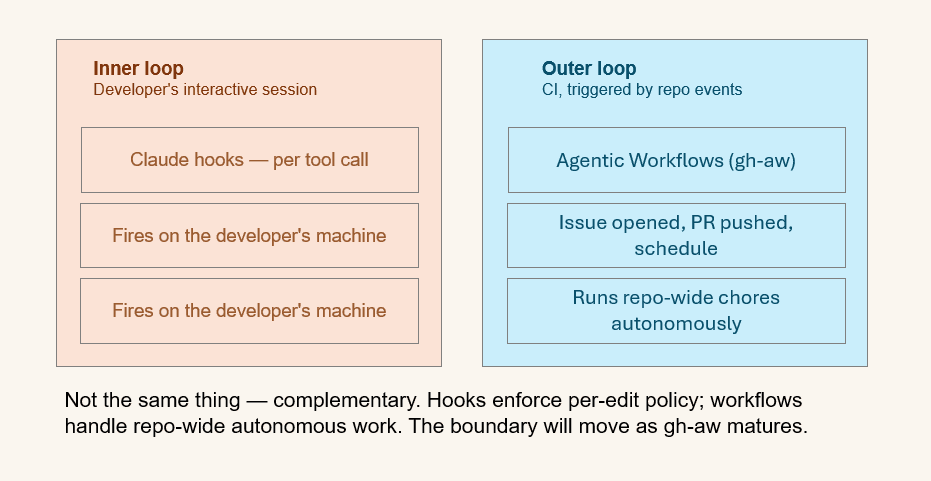
In the common harness: Claude hooks enforce per-edit policy on the developer’s machine; Agentic Workflows handle repo-wide autonomous chores. A typical starter set: auto-triage-issues.md, security-guard.md, docs-sync.md, agents-md-maintainer.md, dependency-update.md.
Five starter workflows. Each is read-only by default and writes only through safe outputs. Compile with: gh aw compile --strict.
3.7 — As an enterprise admin I need real visibility and control over AI agents in our org. What GitHub Enterprise AI Controls actually give me?
Enterprise AI Controls and the “agent control plane” reached general availability on February 26, 2026. It’s a suite giving enterprise admins deeper control and greater auditability over AI agents in the platform.
Concretely, you get:
- Audit-log fields that distinguish agent activity:
actor_is_agent, plususer/user_id, and anagent_session.taskevent. - An agents page whose audit log auto-prefilters Copilot and third-party agents.
- Session visibility beyond the old 1,000-record limit (all sessions in the last 24 hours).
GitHub’s Well-Architected “Governing agents in GitHub Enterprise” guidance (April 2026) maps these into SIEM detections — for example, git.push combined with actor_is_agent to monitor high-risk files, copilot.mcp_* events for MCP policy changes, and repository_ruleset.* with actor_is_agent to catch bypass attempts.
One caveat to design around: the MCP enterprise allowlist remained in public preview even at the broader GA. Don’t make it load-bearing without a fallback.