Part 5 — The Ingestion Plane: Where Accuracy Is Won or Lost
How do you parse every document format faithfully, and how do you know when parsing has failed?
15 min · Updated July 2026
The ingestion plane is the most underinvested part of almost every RAG system. Engineers spend days fine-tuning prompts and hours thinking about chunking, and an afternoon on parsing — when the reality is inverted: no retrieval or agent cleverness can recover information that was destroyed at ingest. A garbled table is garbled forever. A figure stripped of its caption is permanently orphaned. A sentence split mid-clause by a fixed-size chunker will never be retrieved in its correct context.
5.1 Every format breaks in its own way — one parser won't save you
Using a single parser for all content is as misguided as using a single database for all data access patterns. Each format below is framed as the problem you’ll actually run into, followed by what solves it.
5.2 Ten things that go wrong at ingest — and the pattern that stops each
Each row below is a failure you’ll hit in production, written the way you’d describe it to a colleague, paired with the pattern that prevents it and the lifecycle stage it belongs to — parse-time (get the bytes right), chunk-time (keep meaning intact), or operate-time (catch drift at scale).
| # | The problem you’ll hit | Stage | The pattern that stops it |
|---|---|---|---|
| 1 | “My parser invented text that isn’t on the page.” | Parse | Faithful modular parsing (no generative model) |
| 2 | “Bad OCR slipped through as if it were clean text.” | Parse | Confidence-routed OCR escalation |
| 3 | “The numbers came out right but landed in the wrong cells.” | Parse | Table structure fidelity |
| 4 | “A chunk says ‘revenue fell 12%’ with no who, when, or where.” | Chunk | Contextual chunk enrichment |
| 5 | “Retrieval keeps returning half a sentence or half a function.” | Chunk | Structure-aware chunk boundaries |
| 6 | “I got a figure back with no caption, so it’s meaningless.” | Chunk | Cross-modal linking and figure captioning |
| 7 | “An over-long input got silently truncated and embedded wrong.” | Parse | Embedding input validation |
| 8 | “One malformed document quietly broke the whole batch.” | Operate | Idempotent quarantining pipeline |
| 9 | “Bad parses piled up in the index and nobody noticed.” | Operate | Confidence-gated human review |
| 10 | “A parser upgrade silently degraded extraction and we shipped it.” | Operate | Golden ingestion regression set |
Three of these patterns are pure prose in most write-ups, so here is the minimal code for each. First, Pattern 4 — contextual chunk enrichment, the fix for the “revenue fell 12%” problem: prepend each chunk with the document and section context it was extracted from, so it can stand alone at retrieval time.
# Pattern 4: enrich each chunk with the context that gives it meaning.
def enrich_chunk(chunk_text: str, doc_meta: dict, section_path: list[str]) -> str:
    header = (
        f"[Source: {doc_meta['title']} ({doc_meta.get('date','n.d.')})] "
        f"[Section: {' > '.join(section_path)}]"
    )
    return f"{header}
{chunk_text}"      # "revenue fell 12%" → now answerable

# "revenue fell 12%" becomes:
# [Source: FY25 Annual Report (2025-11)] [Section: EMEA > Hardware > Q3]
# revenue fell 12%
Next, Pattern 7 — embedding input validation, which guards the silent truncation that shows up as embedding.truncation_count in the metrics table below. An input longer than the model’s context is silently cut, producing a vector for only part of the text.
# Pattern 7: never embed silently-truncated input. Count and split instead.
import tiktoken

def validate_for_embedding(text: str, model: str, max_tokens: int = 8191):
    enc = tiktoken.encoding_for_model(model)
    n = len(enc.encode(text))
    if n > max_tokens:
        # Emit metric embedding.truncation_count, then split rather than truncate.
        raise EmbeddingTooLong(tokens=n, limit=max_tokens)   # caller re-chunks
    return text
Finally, Pattern 8 — the idempotent quarantining pipeline: a single malformed document must never corrupt or silently drop a whole batch. Wrap each document so failures are isolated, logged, and replayable.
# Pattern 8: isolate failures. One bad doc can't poison the batch, and reruns are safe.
def ingest_batch(docs, process, quarantine, seen: set[str]):
    for doc in docs:
        if doc.content_hash in seen:
            continue                          # idempotent — safe to re-run
        try:
            result = process(doc)
            seen.add(doc.content_hash)
            yield result
        except Exception as e:
            quarantine.put(doc, reason=repr(e))   # isolated, replayable, visible
5.3 "Which tool does what?" — Docling, embeddings, and VLMs without overlap
These three components are not interchangeable — each occupies a distinct, non-overlapping role in the pipeline.
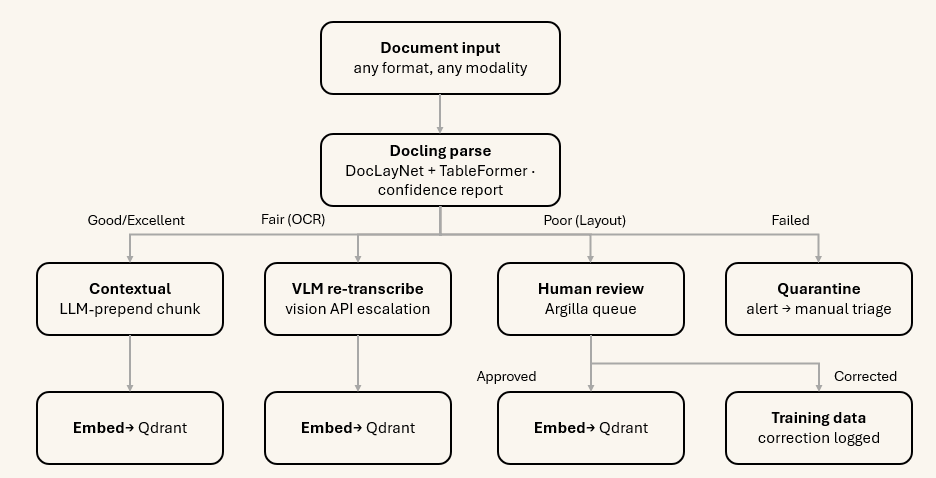
Docling is the authority on document structure. It runs deterministic, model-driven layout analysis (DocLayNet) and table extraction (TableFormer) — no generative component. Its outputs are structural: bounding boxes, element types, heading hierarchy, table cell grids, reading order. It also provides a calibrated confidence report per document and per page.
from docling.document_converter import DocumentConverter, ConversionStatus

converter = DocumentConverter()

for result in converter.convert_all(sources, raises_on_error=False):
    if result.status == ConversionStatus.SUCCESS:
        confidence = result.document.confidence
        # confidence.mean_grade: POOR / FAIR / GOOD / EXCELLENT
        # confidence.low_grade: lowest single-page grade
        # confidence.ocr_score: 0.0 - 1.0 OCR quality
        # confidence.layout_score: 0.0 - 1.0 layout recognition quality
        route_by_confidence(result, confidence)
    else:
        quarantine(result)
Commercial vision APIs are used only for what Docling cannot handle deterministically. There are exactly three cases: tier-escalation OCR when Docling’s ocr_score is below threshold; figure captioning when a figure element has no associated caption in the document structure; and complex table re-extraction when structural ambiguity is present. Vision API calls are conditional, not universal. Applying them to every element would be extremely expensive and would introduce generative risk on clean documents that Docling handles deterministically.
OpenAI text-embedding-3 is applied after structural integrity is confirmed. It never embeds raw, unvalidated parser output. Garbage in, garbage embedded — and garbage embedded means garbage retrieved.
The data flow is a routing system with explicit quality gates, not a pipeline:
5.4 "How do I even know ingestion is failing?" — observability’s three jobs
Observability in ingestion serves three distinct functional roles.
If you watch only one metric to start, watch docling.escalation_rate — a spike for a new source is the earliest signal that a document class is breaking your parsers, and it moves before answer quality visibly degrades.
| Metric | Source | Alert condition |
|---|---|---|
| docling.conversion_status | ConversionStatus enum | Any FAILED count above threshold |
| docling.mean_grade | confidence.mean_grade | Distribution shift toward POOR/FAIR |
| docling.ocr_score | confidence.ocr_score | Mean below 0.7 for a source type |
| docling.escalation_rate | OCR routing logic | Sudden spike for a new source |
| embedding.cache_hit_rate | Redis cache | Drop below 60% (costly) |
| embedding.truncation_count | Pre-flight tiktoken check | Any non-zero in a batch |
| ingestion.quarantine_depth | Quarantine queue | Absolute threshold |
| ingestion.dedup_ratio | Hash dedup | Unexpected zero (may indicate hash collision) |
| contextual_prepend.cache_hit_rate | LiteLLM prompt cache | Drop signals cost increase |
5.5 "Do I really have to label everything?" — no, only what the gates flag
This is the part that most RAG implementations skip entirely, and it is the part that explains why some systems compound accuracy over time while others decay. The human’s role is not to replace automation — it is to curate the quality gates and training signals that automation cannot generate for itself.
The principle: label selectively, never in bulk. You never review every document. You review what the confidence signals flag. Steady-state human effort is low; it is front-loaded in bootstrapping and then sustained by a small, targeted review queue.
The three pipeline gates where humans can intervene:
The recommended annotation platform is Argilla (Apache-2) for AI-engineer and domain-expert collaboration on datasets. Label Studio (Apache-2) is preferred when reviewers need to work visually on the document image itself — bounding boxes, OCR regions, table cells.